Create clear, professional risk assessments in minutes. List hazards, set measures and assign responsibilities, then download a clean PDF branded with your organisation.
Get Started
Create a Risk Assessment
1
Use of ICT Equipment Risk Assessment
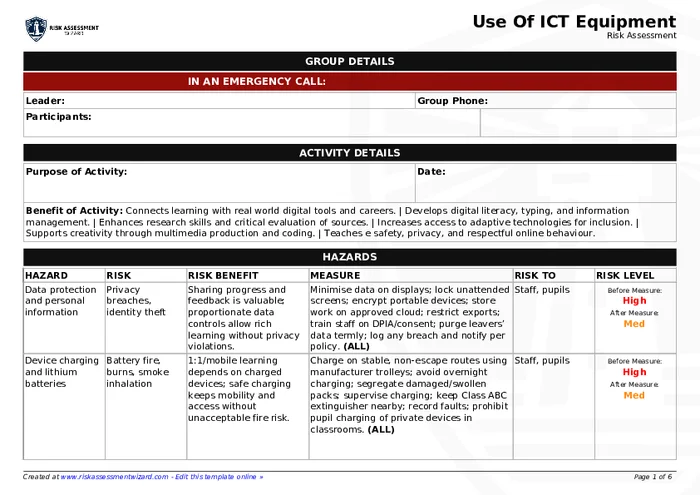
Create a professional, comprehensive risk assessment for use of ict equipment in school & education settings. Tailor hazards and measures to your needs and download a professional PDF. Add your own branding.
Begin straight away; create a free account later if you want to save.
What this covers.
This template focuses on typical risks and controls for use of ict equipment in school & education settings. You can add, remove or adapt items to match your context.
Potential benefits
Supports creativity through multimedia production and coding.
Teaches e safety, privacy, and respectful online behaviour.
Increases access to adaptive technologies for inclusion.
Enhances research skills and critical evaluation of sources.
Develops digital literacy, typing, and information management.
Typical hazards & measures
Passwords and weak authentication
— Enforce strong, unique passwords; rotate termly for pupils; MFA for staff/admin; prevent shared logins; password vault for staff; instant reset route in class; auto-lock screens after short inactivity.
Eye strain and screen glare
— Position screens perpendicular to windows; use blinds; adjust brightness/contrast; follow 20-20-20 breaks; avoid high-glare white themes; enable blue-light modes late in the day.
Printer and copier hazards
— Site devices on stable surfaces with airflow; train staff to clear jams safely; store toner locked; wear gloves for spills; allow cool-down before maintenance; keep lids shut during scans; manage paper stacks to avoid lifting injuries.
Shared device hygiene and infection control
— Allocate one device per session; disinfect touchpoints between classes; provide hand sanitiser at entrances; rotate cloths/wipes; quarantine visibly soiled kit; avoid sharing headsets without disposable covers.
Overheating and ventilation of devices
— Keep vents clear of papers/cloths; use trolleys/racks with airflow; clean filters termly; avoid stacking laptops; monitor ambient temps; relocate kit from radiators; power down overheating units and log tickets for cleaning or fan replacement.
How to use this template
Click Create Risk Assessment: Use of ICT Equipment to begin immediately.
Review suggested hazards and measures, then tailor as needed.
Download your PDF. Create a free account if you want to save.
To provide the best experiences, we use technologies like cookies to store and/or access device information. Consenting to these technologies will allow us to process data such as browsing behavior or unique IDs on this site. Not consenting or withdrawing consent, may adversely affect certain features and functions.
Functional
Always active
The technical storage or access is strictly necessary for the legitimate purpose of enabling the use of a specific service explicitly requested by the subscriber or user, or for the sole purpose of carrying out the transmission of a communication over an electronic communications network.
Preferences
The technical storage or access is necessary for the legitimate purpose of storing preferences that are not requested by the subscriber or user.
Statistics
The technical storage or access that is used exclusively for statistical purposes.The technical storage or access that is used exclusively for anonymous statistical purposes. Without a subpoena, voluntary compliance on the part of your Internet Service Provider, or additional records from a third party, information stored or retrieved for this purpose alone cannot usually be used to identify you.
Marketing
The technical storage or access is required to create user profiles to send advertising, or to track the user on a website or across several websites for similar marketing purposes.